Did your website experience a sudden change in rankings, impressions, clicks, or organic traffic between late May and early June 2026? The Google May 2026 Core Update may have contributed to that movement—but a traffic decline during an update does not automatically mean your website was penalised.
Google released the update on May 21, 2026, and completed its rollout on June 2, 2026. During this period, some websites may have gained visibility while others may have experienced ranking volatility.
This guide explains what Google officially confirmed, what website owners should evaluate, how to diagnose a ranking drop, and which actions can support long-term Google Core Update recovery.
What Was the Google May 2026 Core Update?
The Google May 2026 Core Update was a broad change to Google’s search ranking systems. Core updates are designed to improve how Google assesses and ranks helpful, reliable, and relevant content across search results.
According to the official Google Search Status Dashboard, the update:
- Started on May 21, 2026
- Finished on June 2, 2026
- Took approximately 12 days to complete
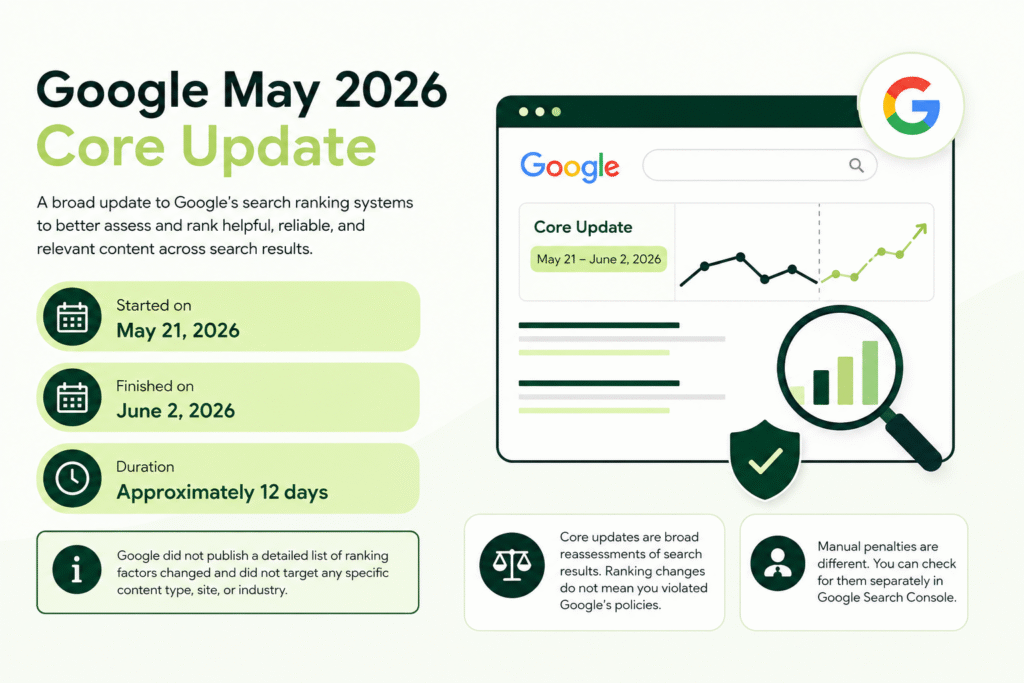
Google did not publish a detailed list of individual ranking factors changed during this update. It also did not confirm that the update specifically targeted AI-generated content, affiliate websites, backlinks, or any particular industry.
Core updates are broad reassessments of search results. A page moving down does not necessarily mean it violated Google’s policies. Another page may simply have been assessed as more useful, current, trustworthy, or relevant for a particular search.
A manual penalty is different. Manual actions are issued when a human reviewer determines that a website has violated Google’s spam policies. You can check for these separately inside Google Search Console.
What Changed After the May 2026 Core Update?
Google officially confirmed the rollout dates but did not announce specific ranking-system changes for the May update. Therefore, claims that it “targeted” one specific content format or website type should be treated carefully.
Instead of searching for one new ranking factor, website owners should evaluate the broader quality areas that commonly matter during core updates.
Search Intent Alignment
Search intent is the purpose behind a query. A user may be looking for information, a comparison, a product, a local service, or a direct answer.
A page can be well written but still lose rankings when it no longer matches what users expect. For example, an informational article may struggle if Google now prioritises product pages, tools, videos, or comparison guides for the query.
Review the current first-page results and identify:
- The type of pages ranking
- The level of detail provided
- The format users appear to prefer
- Whether recent information is important
- Which questions competitors answer clearly
Do not copy the ranking pages. Use them to understand the expected search experience and then create something more useful.
Originality and Content Depth
Content that only repeats information already available across several websites may struggle to demonstrate unique value.
Strong content should contribute something meaningful, such as:
- Original examples
- Clearer explanations
- First-hand observations
- Practical processes
- Screenshots
- Comparisons
- Relevant data
- Expert commentary
- Answers to overlooked questions
Length alone is not a quality signal. A concise article that completely answers the query can be more useful than a long article filled with repetition.
First-Hand Experience
First-hand experience can help distinguish genuinely helpful content from generic summaries.
Depending on the topic, experience may be demonstrated through:
- A product that was actually tested
- A process the author followed
- Screenshots from a real account
- An original case study
- Challenges faced during implementation
- Results and limitations
- Before-and-after examples
Never invent experience, customer results, or case studies. Where original company evidence is not available, explain the process accurately without pretending it was personally tested.
Trust and Expertise Signals
Users should be able to understand who created the content, why they are qualified to discuss the topic, and which sources support important claims.
Review your:
- Author biography
- About page
- Contact information
- Business details
- Editorial policy
- Review process
- Source citations
- Published and updated dates
- Customer reviews and case studies
E-E-A-T—experience, expertise, authoritativeness, and trustworthiness—is best treated as a content-quality framework rather than a single ranking factor.
Search-Engine-First Content
Content written mainly to capture search traffic may underperform when it does not provide a satisfying user experience.
Common warning signs include:
- Publishing across unrelated topics
- Repeating keywords unnaturally
- Summarising competitors without adding value
- Expanding articles only to reach a word count
- Publishing hundreds of lightly edited pages
- Changing dates without updating the information
- Creating content about topics outside the website’s expertise
SEO should help search engines understand useful content. It should not replace the need to create genuinely helpful content.
Generic AI-Generated Content
Google has not said that all AI-assisted content is automatically harmful. The important issue is why and how the content was created.
AI-assisted content may become a problem when it is:
- Factually inaccurate
- Mass-published without review
- Repetitive or generic
- Created only to manipulate rankings
- Missing first-hand knowledge
- Unhelpful to the intended audience
AI can support research, outlining, editing, and production, but the final article should be accurate, original, reviewed, and created for users. Businesses adapting to newer search experiences should also understand how Google AI Overviews are affecting SEO in 2026.
Which Websites Were Most Likely to Be Affected?
Google has not released an official category-by-category list of winners and losers. However, certain weaknesses can make a website more vulnerable when search systems reassess quality and relevance.
These include:
- Thin pages that provide little useful information
- Several pages targeting almost identical keywords
- Outdated statistics, recommendations, or screenshots
- Content that does not satisfy the current search intent
- Websites publishing large volumes of generic content
- Weak author, business, or trust information
- Pages overloaded with promotions or affiliate links
- Poor mobile usability or intrusive advertising
- Crawling, indexing, or canonical problems
- Content that summarises other sources without original value
Not every website with one of these issues lost rankings. Similarly, a ranking decline does not prove that one particular issue caused the change.
A proper diagnosis requires comparing dates, pages, queries, devices, countries, and conversions.
How to Check Whether the Update Affected Your Website
Compare the Correct Date Range
Avoid judging performance while an update is still rolling out. Daily rankings can fluctuate significantly during this period.
For the May 2026 update, exclude the May 21 to June 2 rollout period from your main comparison.
A cleaner comparison could be:
- Before the update: May 7–20, 2026
- After the update: June 10–23, 2026
Use equal date ranges and consider seasonality, promotions, holidays, and changes in search demand.
If your business is highly seasonal, also compare the data with the same period in 2025.
Check Google Search Console
Open the Performance report in Google Search Console and compare the pre-update and post-update periods.
Review:
- Total clicks
- Total impressions
- Average CTR
- Average position
- Search queries
- Landing pages
- Countries
- Devices
- Search appearance
- Web, image, video, and news performance
Do not rely only on the average position for the entire website. A few high-volume queries can significantly change the average.
Export the page and query data to identify:
- Pages that lost the most clicks
- Queries that dropped from the first page
- Pages that gained impressions but lost CTR
- Countries or devices where the decline was strongest
- Search types affected by the drop
Your Search Console setup also matters. Review the difference between a Search Console platform property and a domain property to ensure you are analysing the right data.
Review Google Analytics 4
Google Search Console shows search visibility, while GA4 helps you understand what happened after users reached the website.
Compare organic landing-page performance for:
- Sessions
- Engaged sessions
- Engagement rate
- Key events
- Leads
- Purchases
- Revenue
- New and returning users
A traffic drop with stable conversions may be less serious than a smaller traffic decline that removes your highest-converting visits.
You should therefore prioritise business impact, not just lost sessions.
Separate Site-Wide and Page-Level Drops
A site-wide decline may indicate a broader issue involving content quality, technical SEO, trust, or the website’s overall topical focus.
A page-level decline may be caused by:
- Changed search intent
- Outdated information
- A stronger competing page
- Keyword cannibalisation
- Weak internal links
- An indexing issue affecting that URL
Separate affected pages into categories such as blog posts, service pages, product pages, collection pages, and location pages. Different page types may require different recovery actions.
Check Other Possible Causes
A traffic drop around an update may be correlation rather than causation.
Before rewriting content, check for:
- Seasonal changes in demand
- Incorrect GA4 tracking
- Website migration problems
- Removed tracking codes
- Accidental noindex tags
- Canonical errors
- robots.txt changes
- Server downtime
- Slow page performance
- Security issues
- Manual actions
- URL changes
- Lost backlinks
- Competitors improving their content
- Paid campaigns affecting branded search demand
Ranking-Drop Diagnosis Table
| Ranking Drop Pattern | Possible Cause | What to Check | Recommended Action |
| Site-wide impressions decline | Broad relevance, quality, or technical issue | Page groups, index coverage, crawl data | Conduct a full site and content audit |
| One page loses rankings | Intent mismatch or stronger competition | Queries, current SERP, content freshness | Update the page around current user needs |
| Impressions stable but clicks decline | Lower CTR or changed SERP layout | Titles, descriptions, AI results, rich features | Improve snippets without using clickbait |
| Mobile traffic drops | Mobile UX or performance issue | Mobile reports and Core Web Vitals | Fix usability and speed problems |
| Branded traffic declines | Lower brand demand or tracking issue | Brand queries, campaigns, GA4 setup | Verify tracking and review brand activity |
| Several similar pages decline | Keyword cannibalisation | Ranking URLs for overlapping queries | Consolidate or differentiate the pages |
| Traffic drops but rankings stay stable | Lower search demand | Impression trends and seasonal data | Review seasonality and demand patterns |
How to Recover Rankings After the Google May 2026 Core Update
1. Identify the Pages That Lost the Most Visibility
Export Search Console page data for equal pre-update and post-update periods.
Calculate the difference in:
- Clicks
- Impressions
- CTR
- Average position
Prioritise URLs based on:
- Revenue or lead value
- Size of the decline
- Previous ranking position
- Conversion potential
- Ability to improve the page
Do not begin by rewriting every URL. Start with pages that previously generated meaningful business results.
2. Recheck Search Intent
Search the affected query manually and study the current first-page results.
Ask:
- Are blogs, product pages, service pages, or tools ranking?
- Are the results beginner-friendly or advanced?
- Do users want a quick answer or a complete guide?
- Are freshness and recent dates important?
- Do top results include videos, tables, calculators, or examples?
- Is the query now more commercial than informational?
If the page format is fundamentally wrong for the query, adding more keywords is unlikely to solve the problem.
3. Improve Content Quality and Completeness
Content improvement should go beyond changing a few sentences.
Review the page section by section and:
- Remove generic introductions
- Correct inaccurate or outdated facts
- Answer missing user questions
- Replace vague statements with specific explanations
- Add practical examples
- Improve headings
- Break up difficult paragraphs
- Remove repeated points
- Add comparison tables where useful
- Make the next action clear
Do not preserve weak content simply because it contains a target keyword.
4. Add First-Hand Experience and Original Value
Original value gives users a reason to choose your page instead of another result.
Depending on the topic, add:
- Real screenshots
- An original workflow
- Lessons from implementation
- Customer questions
- Product testing details
- Original photographs
- Case-study results
- Expert interviews
- Common mistakes observed by your team
For company-specific examples, use verified data and obtain permission before publishing client information.
5. Strengthen E-E-A-T Signals
Trust improvements should be visible and verifiable.
Consider adding or improving:
- Named authors
- Author pages
- Relevant credentials
- Reviewer information
- Clear business ownership
- Contact details
- Editorial standards
- References for factual claims
- Accurate publication dates
- Meaningful update dates
- Testimonials
- Case studies
- Privacy and policy pages
For medical, financial, legal, and other high-impact topics, qualified expert review is especially important.
6. Consolidate Thin or Overlapping Content
Several pages competing for the same keyword can weaken performance.
Use Search Console to identify cases where different URLs repeatedly appear for the same query.
Depending on the situation, you may:
- Merge two weak articles into one strong guide
- Redirect an outdated URL to the best replacement
- Differentiate pages targeting different intents
- Add a canonical tag for genuine duplicates
- Remove a page only when it cannot be improved
Deleting content should be a last resort, not an immediate recovery tactic.
7. Improve Internal Linking
Internal links help users discover related information and help search engines understand page relationships.
Strengthen affected pages by:
- Linking from relevant high-authority pages
- Using descriptive anchor text
- Connecting topic-cluster articles
- Linking blogs to appropriate service pages
- Removing links to redirected or broken URLs
- Ensuring valuable pages are not orphaned
For ecommerce websites, this may include linking between blogs, collections, products, and buying guides. The on-page SEO checklist for Shopify websites provides additional implementation points for store owners.
8. Fix Technical SEO Problems
Content improvements may not help when Google cannot crawl, index, render, or understand the page properly.
Review:
- Index coverage
- Noindex directives
- robots.txt
- Canonical tags
- Redirect chains
- Broken internal links
- XML sitemaps
- Mobile usability
- JavaScript rendering
- Core Web Vitals
- Server errors
- Structured data
- Duplicate URLs
- Pagination and faceted navigation
Prioritise issues affecting important pages rather than chasing every minor warning in an SEO tool.
9. Review Backlinks Carefully
A ranking decline does not mean you should immediately disavow backlinks or purchase new ones.
Check whether important pages lost valuable links or whether your link-building activity relies heavily on irrelevant directories, repeated anchors, or low-quality placements.
Focus on earning links through:
- Original research
- Useful tools
- Expert resources
- Digital PR
- Partnerships
- Strong case studies
- Valuable industry content
Websites can also increase organic traffic without buying backlinks by improving content, internal linking, topical coverage, and user experience.
10. Improve Titles and Meta Descriptions
When impressions remain stable but clicks decline, review your search snippets.
A strong title should:
- Match the query
- Explain the page clearly
- Include the main topic naturally
- Set accurate expectations
- Avoid exaggerated claims
A meta description does not guarantee a higher ranking, but it can help communicate relevance and improve qualified clicks.
Do not change high-performing titles simply because a tool recommends adding another keyword.
11. Monitor Changes Instead of Editing Daily
After making meaningful improvements, document:
- The URL changed
- The date of the update
- The problem identified
- The action taken
- The metric being monitored
Avoid making major changes every few days. Constant edits make it difficult to understand which action helped or harmed performance.
Monitor trends weekly and evaluate results over a reasonable period.
What Not to Do After a Core Update
Avoid reacting emotionally to short-term ranking volatility.
Do not:
- Delete large sections immediately
- Rewrite every article without diagnosis
- Add the exact keyword to every paragraph
- Buy large volumes of low-quality backlinks
- Change URLs unnecessarily
- Copy the current top-ranking page
- Publish more generic AI-generated articles
- Update dates without improving content
- Make several major changes at once
- Expect instant recovery
- Guarantee a return to previous positions
Review these additional SEO mistakes to avoid in 2026 before implementing a recovery plan.
How Long Does Core Update Recovery Take?
There is no fixed recovery timeline.
Some page-level improvements may show an effect after Google recrawls and reprocesses the URL. Larger site-wide changes may take several weeks or months to be fully reassessed.
In some cases, stronger movement may become visible during a future core update. However, websites do not always need to wait for another announced update because Google continuously makes smaller changes to its ranking systems.
Recovery depends on:
- The severity of the decline
- Whether the correct issue was identified
- The number of affected pages
- Crawl frequency
- Website authority
- Competitor improvements
- Quality of the changes
- Whether the new content better satisfies users
No SEO agency or consultant can guarantee that a page will return to its previous position.
Google Core Update Recovery Checklist
Use this checklist before and after making changes:
- Confirm the official rollout dates
- Exclude the rollout period from comparisons
- Compare equal date ranges
- Review pages and queries separately
- Check web, image, video, and news performance
- Measure leads and revenue, not just traffic
- Identify site-wide versus page-level declines
- Recheck the current search intent
- Update outdated or incomplete information
- Add original examples and experience
- Strengthen author and trust information
- Consolidate overlapping pages
- Improve contextual internal linking
- Check crawling, indexing, and canonicalisation
- Review mobile UX and Core Web Vitals
- Audit lost and suspicious backlinks carefully
- Improve titles when CTR has declined
- Record every important change
- Monitor trends without making daily edits
Frequently Asked Questions
What was the Google May 2026 Core Update?
The Google May 2026 Core Update was a broad change to Google’s ranking systems intended to improve the quality and relevance of search results. It was not announced as a penalty against a particular website type, industry, or content-production method.
When did the May 2026 Core Update finish?
The update began on May 21, 2026, and completed on June 2, 2026. Website owners should avoid using the rollout period alone to evaluate performance because rankings can fluctuate while an update is still being deployed.
Why did my website traffic drop after the Google update?
Possible causes include changed search intent, stronger competing pages, outdated content, technical problems, reduced search demand, lower CTR, or broader quality reassessment. Compare page-level and query-level data before assuming the core update was the only cause.
Can a website recover from a Google Core Update?
Yes, a website can recover, but recovery is not guaranteed. Focus on meaningful improvements to content quality, search intent, technical SEO, trust, internal linking, and user experience rather than looking for a single quick fix.
Should I delete pages that lost rankings?
Not immediately. First determine whether the page can be updated, merged, repositioned, or differentiated. Delete or redirect content only when it provides no meaningful value and cannot reasonably be improved.
How long does it take to recover lost Google rankings?
Some improvements may be recognised within days or weeks, while broader site-level reassessment can take several months. Recovery may also become more visible during future ranking-system updates.
Final Thoughts
The Google May 2026 Core Update should not be treated as a signal to rewrite your entire website overnight.
Start with data. Confirm which pages and queries declined, rule out technical and seasonal causes, evaluate the current search intent, and prioritise the pages that matter most to your business.
Sustainable Google ranking drop recovery comes from improving the overall usefulness, reliability, clarity, and accessibility of your website—not from chasing rumours about individual ranking factors.
Businesses that need help diagnosing lost visibility can explore Viral Groww’s professional SEO services in Delhi NCR for a structured review of content, technical SEO, search intent, and organic performance.