Introduction
If you have recently logged into your Google Search Console dashboard, you may have noticed something new — a third option called Platform Property sitting alongside the familiar Domain Property and URL Prefix Property.
This has left many website owners and SEO professionals asking the same question: What exactly is a Platform Property, and how is it different from a Domain Property?
It is a fair question. Google Search Console is one of the most important SEO tools available for tracking search performance, website indexing, and organic traffic. Choosing the right property type directly affects the quality and completeness of the data you see.
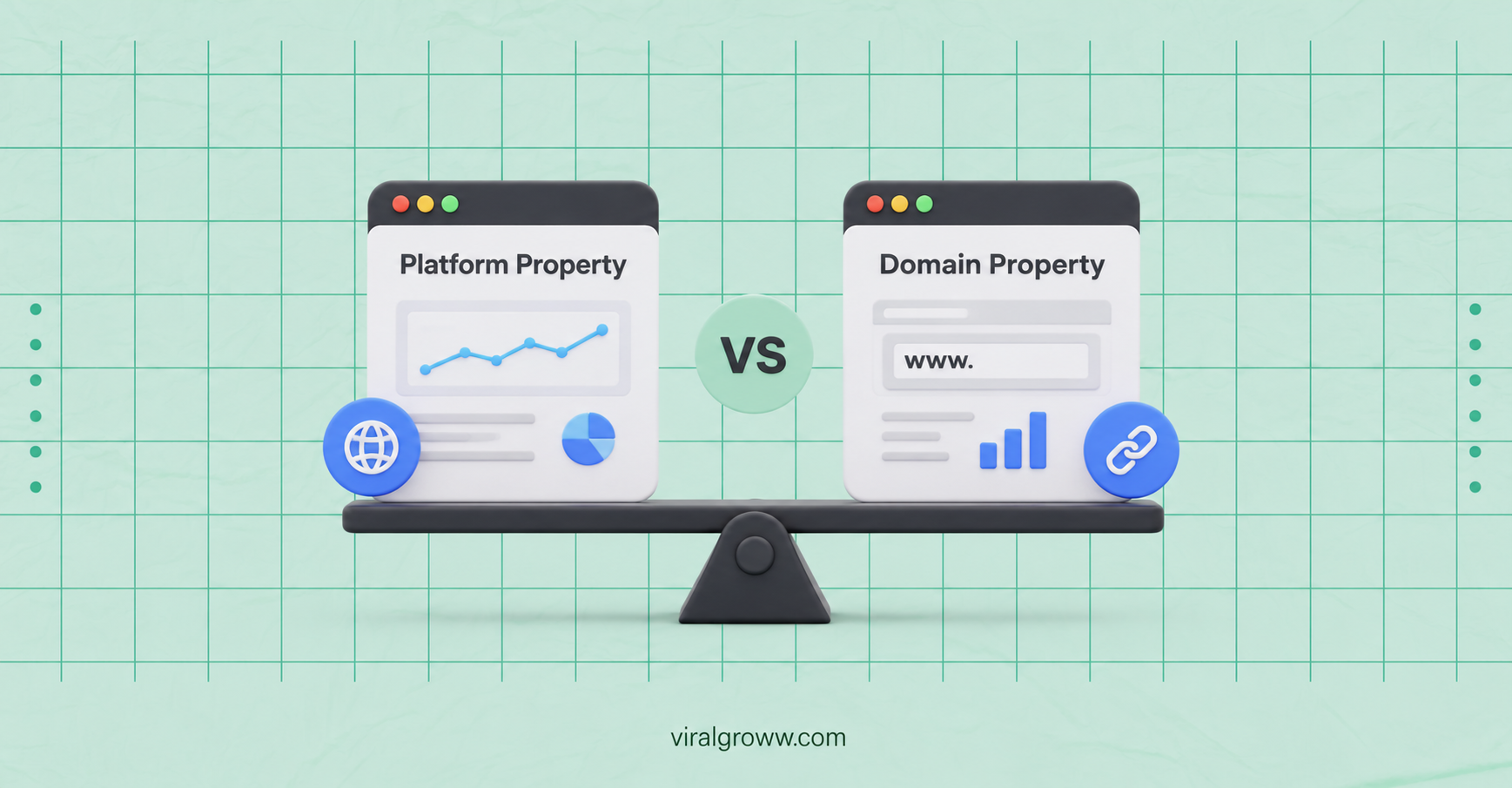
In this guide, we will break down everything you need to know about Google Search Console Platform Property vs Domain Property — what each one does, how they compare, and which one makes the most sense for your website in 2026.
Why This Google Search Console Update Matters for SEO Professionals ?
Over the years, Google Search Console has evolved from a simple webmaster tool into one of the most essential SEO platforms for monitoring website health, search visibility, and organic performance. Every new update introduced by Google aims to improve how website owners and digital marketers understand their presence in Google Search.
The latest Google Search Console update has introduced a Platform Property experience for selected users. While Domain Property and URL Prefix Property remain the primary property types for website verification, some users are now seeing an additional Platform Property option when adding a new property.
This update suggests that Google is exploring new ways to help creators, businesses, and website owners manage different types of online properties within Search Console. Since the rollout is gradual, not every account will have access to this feature, and Google has not yet released complete documentation covering all supported platforms or functionality.
For now, Domain Property continues to be the recommended option for comprehensive website SEO monitoring. However, understanding how Platform Property differs prepares SEO professionals for future Search Console enhancements and helps them stay ahead of upcoming changes.
What Is Google Search Console?
Google Search Console (formerly Google Webmaster Tools) is a free platform provided by Google that helps website owners monitor how their site performs in Google Search.
With Google Search Console, you can:
- Track search visibility and keyword rankings
- Submit sitemaps for Google indexing
- Monitor index coverage and fix crawl errors
- Use the URL inspection tool to check individual pages
- Analyse crawl data and spot technical SEO issues
- Review performance reports showing clicks, impressions, and average positions
In short, it is the foundation of any solid SEO monitoring strategy.
Whether you run a small blog or a large eCommerce store, understanding how to use Google Search Console properly — including picking the right property type — can make a real difference in your website performance tracking.
Understanding Google Search Console Property Types
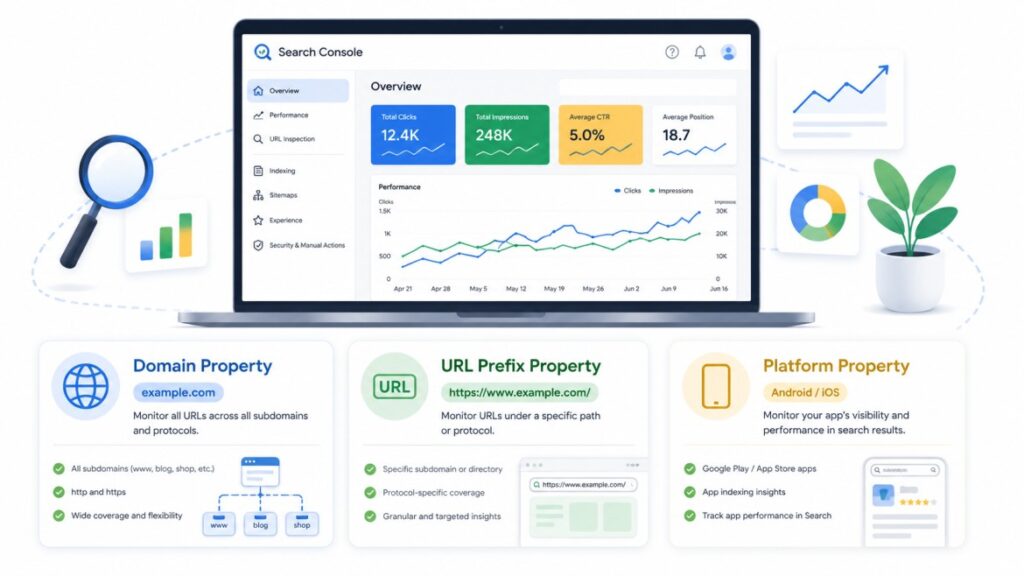
Before jumping into the comparison, it is important to understand that Google Search Console currently offers three property types when you add a new property:
- Domain Property — Covers your entire domain, including all subdomains and both HTTP/HTTPS versions
- URL Prefix Property — Covers only a specific URL prefix (e.g., https://www.example.com/)
- Platform Property (New — Limited Rollout) — A new type being rolled out gradually for select eligible platforms
Each property type collects data differently. The type you choose will determine what data you can see, how you verify ownership, and how comprehensively your search analytics are reported.
⚠️ Note: Platform Property is currently being rolled out gradually and is only available to selected users. Many users will still only see Domain Property and URL Prefix Property in their Search Console accounts.
What Is a Domain Property in Google Search Console?
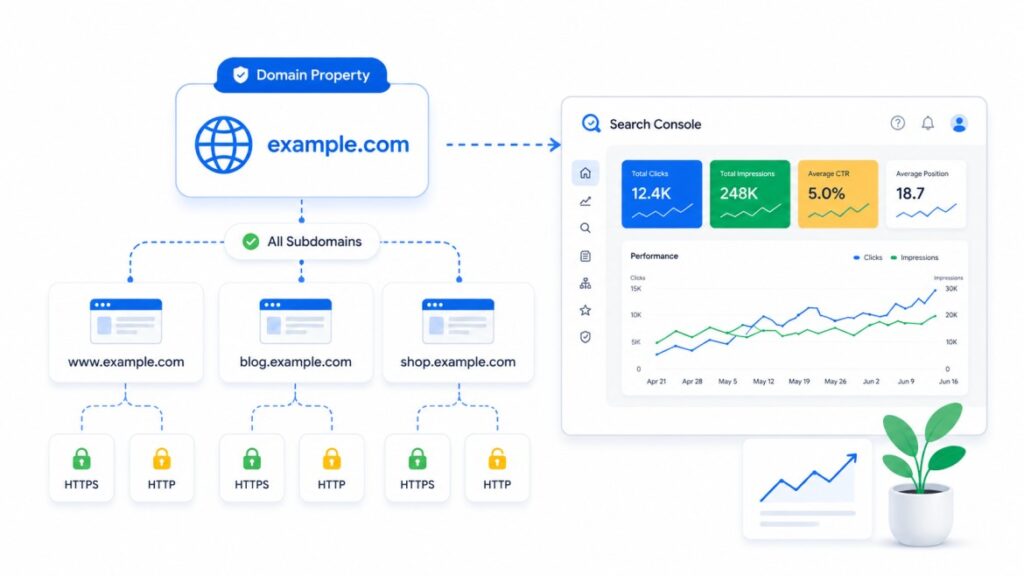
A Domain Property in Google Search Console is a property type that captures data across your entire domain.
This means it includes:
- All subdomains (e.g., blog.example.com, shop.example.com)
- Both HTTP and HTTPS versions of your site
- All URL paths under the domain
- All protocol variations
Why Domain Property Is Powerful
When you set up a Domain Property, you get a complete, unified view of all your website’s search data in one place. You do not have to create multiple properties for different versions of your site.
For example, if your website has both http://example.com and https://www.example.com, a Domain Property will capture performance data from both versions automatically. This makes it far more efficient for website SEO tracking.
How to Verify a Domain Property
Domain Property uses DNS verification only. You need to add a TXT record to your domain registrar (e.g., GoDaddy, Namecheap, Cloudflare) to complete property verification.
This is slightly more technical than URL Prefix verification, but it is more comprehensive and reliable.
Who Should Use Domain Property?
- Website owners who want full, complete search data
- SEO professionals managing multiple subdomains
- Businesses with both HTTP and HTTPS versions still active
- Anyone who wants a single, clean Google Search Console dashboard view
Domain Property remains the recommended choice for most websites and for tracking overall website SEO performance.
What Is a Platform Property in Google Search Console?
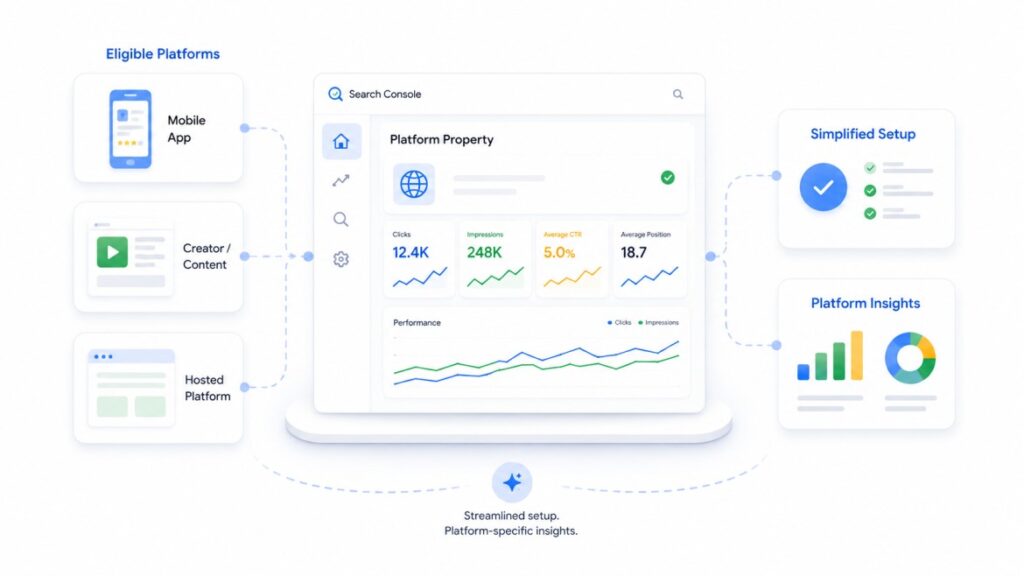
The Platform Property is a newly introduced experience in Google Search Console that has started appearing for selected users as part of a gradual rollout. Unlike the traditional Domain Property and URL Prefix Property, this new option is designed to simplify property setup and management for eligible platform-based content.
Although the feature has generated significant interest within the SEO community, Google has not yet published complete public documentation explaining all of its capabilities, supported platforms, or long-term functionality. As a result, many users may not see the Platform Property option in their Search Console account, and its availability can vary.
What We Know So Far
Based on the current rollout and publicly available information, Platform Property appears to:
- Simplify the property creation process for eligible platforms.
- Reduce the complexity of traditional verification methods in certain scenarios.
- Provide relevant search performance insights for supported platform-based content.
- Offer a more streamlined Search Console experience for selected users.
Since the feature is still evolving, Google may expand its capabilities or modify how it works as the rollout continues.
Limited Rollout and Availability
One important thing to understand is that Platform Property is not currently available to every Google Search Console user. Google is introducing this feature gradually, which means some accounts may continue to display only the traditional Domain Property and URL Prefix Property options.
If you don’t see Platform Property in your account, there’s nothing wrong with your Search Console setup. It simply means the feature has not yet been enabled for your account.
Does Platform Property Replace Domain Property?
No. At this stage, Platform Property does not replace Domain Property.
For website owners, businesses, bloggers, and SEO professionals, Domain Property remains the recommended choice because it provides complete visibility across your entire website, including all subdomains, protocols (HTTP and HTTPS), and URL variations.
Platform Property should currently be viewed as an additional property type being introduced for selected use cases rather than a replacement for the existing property options.
Should You Start Using Platform Property?
If Platform Property becomes available in your account and is relevant to your content or platform, you can explore its features. However, for comprehensive website SEO monitoring, Domain Property continues to be the industry standard.
As Google expands the rollout and publishes more official guidance, we can expect additional details about supported platforms, verification methods, and reporting capabilities. Until then, SEO professionals should continue relying on Domain Property for accurate website performance tracking while monitoring Google’s official announcements for future updates.
Google Search Console Platform Property vs Domain Property: Side-by-Side Comparison
Here is a detailed comparison table to help you understand the key differences:
| Feature | Domain Property | Platform Property |
| Coverage | Entire domain (all subdomains, HTTP/HTTPS) | Platform-specific (limited to eligible platforms) |
| Verification Method | DNS TXT record only | Platform-based (method may vary) |
| Availability | Available to all users | Limited rollout — not available to all users |
| Data Completeness | Full website-wide search data | Platform-specific data |
| Subdomains Included | Yes (all subdomains) | Not applicable in the same way |
| HTTP + HTTPS Coverage | Yes | Depends on platform |
| Best For | Full-site SEO monitoring | Managing eligible platform content |
| Sitemap Submission | Yes | Depends on platform |
| URL Inspection Tool | Yes | Not confirmed for all cases |
| Performance Report | Full performance report across domain | Platform-specific performance data |
| Recommended For Most Users | ✅ Yes | ⚠️ Limited rollout only |
As you can see, for the vast majority of website owners and SEO professionals, Domain Property remains the go-to choice for complete and reliable search analytics.
Domain Property vs URL Prefix Property — How They Differ
Since many users still choose between Domain Property vs URL Prefix Property, here is a quick comparison to add clarity:
| Feature | Domain Property | URL Prefix Property |
| Coverage | Entire domain + all subdomains | Only the specified URL prefix |
| HTTP/HTTPS | Both covered | Only the version you specify |
| Verification | DNS only | Multiple methods available (HTML file, HTML tag, DNS, GA, GTM) |
| Data Scope | Complete | Partial (only the specified prefix) |
| Ease of Setup | Slightly more technical | Easier for beginners |
| Recommended | For most professional use | For tracking specific sections |
Real Example:
Imagine you run an eCommerce website at https://www.myshop.com, and you also have a blog at https://blog.myshop.com.
- A URL Prefix Property for https://www.myshop.com would only show data for the main shop — not the blog.
- A Domain Property for myshop.com would capture data from both, giving you the complete picture.
For businesses running performance marketing campaigns, complete data is critical. Teams at agencies like Viral Groww rely on Domain Property to get accurate, full-picture data before making any SEO or paid media decisions.
Benefits of Platform Property
Although Platform Property is still being introduced gradually, it represents Google’s effort to simplify Search Console for eligible platform-based content.
Potential benefits include:
- Simpler property setup for supported platforms
- Easier management without DNS configuration in certain scenarios
- Dedicated reporting for eligible platform content
- Better experience for creators and businesses using supported publishing platforms
- Reduced complexity compared with traditional verification methods
Because Google has not yet documented every capability publicly, these benefits should be viewed as part of an evolving feature rather than a finalized product.
Which Google Search Console Property Should You Use?
This is the most common question, and the answer depends on your situation.
Use Domain Property If:
- You own and manage your own website or domain
- You want complete, accurate data covering all subdomains and URL variants
- You are running a long-term SEO monitoring strategy
- You need to submit sitemaps and use the full range of Google Search Console features
- You manage SEO for a client or brand and need reliable search performance data
Use URL Prefix Property If:
- You only need to track a specific section of your website
- You do not have access to DNS settings for full domain verification
- You are just getting started and want a simpler setup process
Regarding Platform Property:
Since Platform Property is still in a limited rollout and not available to most users, it is not yet a mainstream option for most SEO strategies. If you see this option in your account and it applies to your platform, you can explore it. But for now, Domain Property is the recommended standard for tracking website SEO performance.
Pro Tip: If you are running an eCommerce store and want to track your full site’s search visibility — from product pages to blog content — setting up a Domain Property gives you the cleanest, most complete data for making smart decisions. Businesses working with the best eCommerce marketing agencies in India always prioritise full-domain data for accurate performance reporting.
Common Mistakes to Avoid
Many website owners accidentally limit their SEO data because they choose the wrong property type or configure Search Console incorrectly. Here are some common mistakes to avoid:
- Using only a URL Prefix Property when managing multiple subdomains
- Forgetting to submit an XML sitemap after verification
- Removing the DNS TXT verification record after setup
- Ignoring Index Coverage and Crawl Error reports
- Monitoring only homepage performance instead of the full website
- Not checking URL Inspection after publishing new content
Avoiding these mistakes ensures you receive complete and accurate SEO data.
How to Set Up a Domain Property in Google Search Console ?
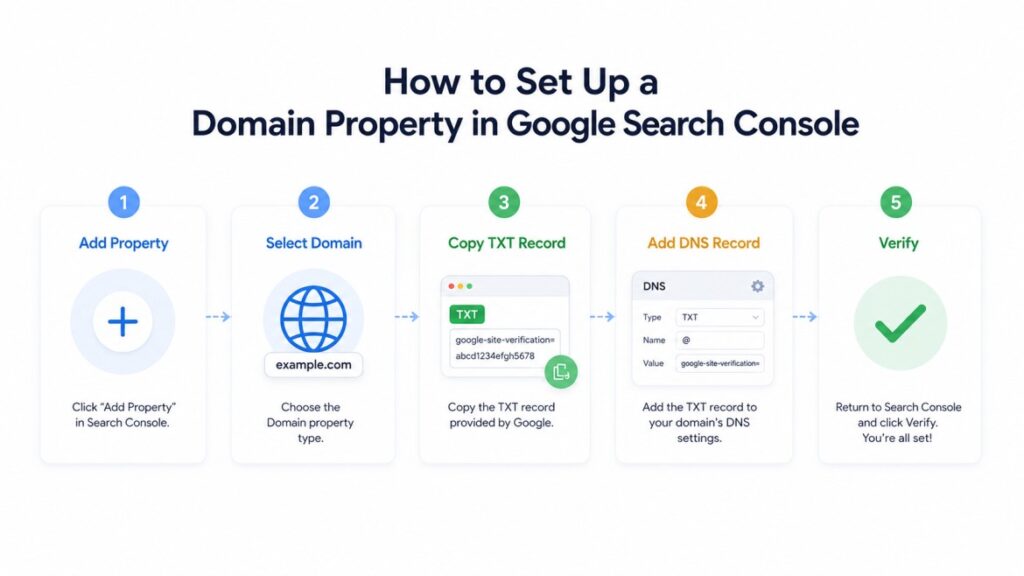
Setting up a Domain Property is straightforward once you have access to your domain registrar.
Step-by-Step Guide:
Step 1: Go to Google Search Console and sign in with your Google account.
Step 2: Click on “Add Property” in the top-left dropdown.
Step 3: Select “Domain” (not URL Prefix) and enter your domain name (e.g., example.com — without http/https or www).
Step 4: Google will provide you with a DNS TXT record — a unique code that looks something like:
google-site-verification=XXXXXXXXXXXXXXXXXXXXXXXX
Step 5: Log in to your domain registrar (GoDaddy, Namecheap, Cloudflare, etc.) and add this TXT record to your DNS settings.
Step 6: Return to Google Search Console and click “Verify”.
Step 7: Once verified, your Domain Property will begin collecting data. It can take 24–72 hours for data to start appearing.
Tips for Successful Verification:
- Make sure you are logged into the correct Google account
- DNS changes can take up to 48 hours to propagate
- If verification fails, double-check that the TXT record was saved correctly in your DNS settings
- Do not delete the TXT record after verification — Google uses it to confirm ongoing ownership
What the Google Search Console 2026 Update Means for You
The Google Search Console 2026 update introducing Platform Property is significant, but it is important to keep perspective.
Here is what we know:
- Google has started rolling out the Platform Property option for selected, eligible users
- The feature is intended to simplify management for certain platforms within Search Console
- The rollout is gradual and limited — most users will not see this option yet
- Domain Property remains the recommended and most reliable property type for standard website SEO
What this update signals is that Google is continuing to evolve Search Console to accommodate a wider range of web presences. As more content is published on platforms outside traditional self-hosted websites, Google is building tools to help creators and businesses track that content’s performance.
However, until Google formally announces broader availability and clear guidelines for Platform Property, it is best to:
- Continue using Domain Property for your primary website performance tracking
- Monitor Google’s official announcements for updates on Platform Property availability
- Not make major SEO strategy changes based on limited-rollout features
If you are working with a professional performance marketing agency, staying ahead of these updates and understanding how they affect your data is part of good ongoing SEO practice. The team at Viral Groww keeps clients informed about exactly these kinds of changes so their strategies remain accurate and effective.
How Viral Groww Uses Google Search Console for SEO ?
At Viral Groww, a performance-focused SEO and performance marketing agency in India, Google Search Console is one of the core tools used across every client engagement.
Here is how the team uses it in real practice:
1. Comprehensive Search Performance Tracking
Using Domain Property, the team gets a complete view of a website’s organic traffic, keyword rankings, and click-through rates — without missing data from subdomains or protocol variations.
2. Index Coverage Monitoring
The index coverage report helps identify pages that are not being indexed, allowing the team to fix issues that could be silently hurting a brand’s search visibility.
3. Sitemap Submission
Submitting sitemaps through Google Search Console ensures that new content is discovered and indexed faster — a critical step for eCommerce sites with large product catalogues.
4. URL Inspection for New Content
The URL inspection tool is used to request indexing for newly published pages, which is particularly useful when running time-sensitive campaigns.
5. Crawl Data Analysis
By regularly reviewing crawl data, the team identifies technical issues like broken links, redirect chains, and server errors that could hurt rankings.
For brands running eCommerce campaigns, combining Google Search Console insights with paid media data gives a much clearer picture of overall performance. If you are running Facebook ads for eCommerce, pairing that data with organic search performance from Google Search Console helps identify which channels are genuinely driving results. Learn more about how Viral Groww’s Facebook Ads team for eCommerce supports growth across channels.
Similarly, for businesses investing in eCommerce ads in India, having accurate Search Console data ensures that the SEO foundation is solid — so paid efforts are not doing the heavy lifting alone.
Frequently Asked Questions (FAQs)
Q1. Is Platform Property better than Domain Property?
Not necessarily — and for most users right now, the answer is no. Domain Property gives you complete, verified search data across your entire domain, including all subdomains and protocol versions. Platform Property is a new, limited-rollout feature that serves a different, more specific use case. Until Platform Property is widely available and its full capabilities are announced by Google, Domain Property remains the better choice for comprehensive SEO monitoring.
Q2. Can I use both Platform Property and Domain Property?
Yes, Google Search Console allows you to have multiple properties in your account. In theory, if you have access to both a Platform Property and a Domain Property, you could use both to monitor different aspects of your presence. However, since Platform Property is still in limited rollout, most users will continue to work with Domain Property as their primary property.
Q3. Which Google Search Console Property is best for SEO?
For most SEO purposes, Domain Property is the best choice. It gives you the widest and most complete view of your website’s search performance, covering all subdomains, HTTP and HTTPS versions, and all pages. This makes it ideal for tracking website indexing, analysing crawl data, and making informed decisions about your overall website SEO strategy.
Q4. Does Platform Property replace Domain Property?
No. Platform Property does not replace Domain Property. They are designed for different purposes. Domain Property is still the recommended standard for website owners managing their own domains. Platform Property appears to be designed for a more specific use case related to eligible platform-based content. Google has not announced that Platform Property will replace the existing property types.
Q5. How do I switch from Domain Property to Platform Property?
You do not need to “switch” in the traditional sense. If Platform Property becomes available in your account and is relevant to your situation, you can add it as a new property in Google Search Console without removing your existing Domain Property. Since Platform Property is still in limited rollout, most users cannot access it yet. We recommend keeping your Domain Property active and continuing to use it for all standard website performance tracking.
Q6. Is Platform Property available for all users?
No. As of 2026, Platform Property is being rolled out gradually and is only available to selected eligible users. If you do not see this option in your Google Search Console account, that is completely normal. Google has not yet announced a timeline for when it will be available to all users. Keep an eye on Google’s official Search Console announcements for updates.
Q7. What is the difference between Domain Property and URL Prefix Property?
A Domain Property covers your entire domain — all subdomains, HTTP, and HTTPS versions — and is verified via DNS. A URL Prefix Property only covers the specific URL prefix you enter (e.g., https://www.example.com/) and offers more verification methods, making it easier to set up. Domain Property is more comprehensive, while URL Prefix Property is useful for tracking specific sections of a website. For most users wanting complete data, Domain Property is recommended.
Q8. How long does it take for Google Search Console to show data after setting up a Domain Property?
After successful verification, it typically takes 24 to 72 hours for data to start appearing in your Google Search Console dashboard. For new websites, it may take a few days to a week before you begin seeing meaningful search performance data, as Google needs time to crawl and index your pages. Submitting a sitemap can help speed up this process.
Conclusion
Understanding the difference between Google Search Console Platform Property vs Domain Property is more important than ever in 2026, as Google continues to evolve its tools.
Here is a quick summary of the key points:
- Domain Property covers your entire domain — all subdomains, HTTP, and HTTPS — and is verified via DNS. It is the recommended standard for comprehensive SEO monitoring and website performance tracking.
- URL Prefix Property covers only a specific URL version and is easier to set up but gives you less complete data.
- Platform Property is a new addition being rolled out gradually to selected users. It is intended for eligible platform-based content management, but it is still in early stages and not yet available to most users.
- For the vast majority of website owners, SEO professionals, and businesses, Domain Property remains the best choice for tracking search visibility, organic traffic, index coverage, and overall website SEO.
As Google expands the rollout of Platform Property and shares more details, it will be worth revisiting its capabilities. For now, focus on getting the most out of your Domain Property — submit your sitemap, monitor your index coverage, use the URL inspection tool regularly, and keep a close eye on your performance reports.
If you are looking for expert help in setting up and using Google Search Console as part of a broader SEO and performance marketing strategy, the team at Viral Groww is ready to help. From SEO to performance marketing and eCommerce growth, Viral Groww works as your long-term growth partner — focused on delivering real, measurable results for your business.
Have questions about setting up your Google Search Console properties or building an SEO strategy? Leave a comment below or reach out to the Viral Groww team — we are happy to help.