Google Search Console was traditionally used to monitor websites. In July 2026, Google introduced a new property type for creators, publishers and brands that publish content on social and video platforms.
Google Search Console Platform Properties allow eligible users to add Instagram, TikTok, X and YouTube accounts and analyse how content from those accounts performs on Google Search. When eligible traffic exists, reports may also appear for Discover and Google News.
This feature does not replace Instagram Insights, TikTok Analytics, X Analytics or YouTube Studio. It measures discovery through Google, not total activity inside each platform.
Last reviewed: July 30, 2026
A Google Search Console Platform Property is a verified Instagram, TikTok, X or YouTube account added as a separate property. It can report clicks, impressions, CTR, average position, search queries and top-performing content from Google. Ownership is confirmed through an authorised login or another supported verification route.
What Are Google Search Console Platform Properties?
A property is an individual asset you monitor in Search Console. Website owners normally use a Domain property for an entire domain or a URL-prefix property for a specific website section.
A Platform Property represents a verified account or channel on a supported third-party platform. A company can keep its website property and separately add each social profile or channel. A website is not required, giving creators without one access to Google discovery data.
Platform Property explained: It is a verified social account or video channel with its own Search Console performance reporting. It is not a Domain property, URL-prefix property or Search Console Association.
Which Social Media Platforms Are Supported?
As of July 30, 2026, Google officially lists four platforms:
| Platform | Property tracked | Examples of eligible content |
| Profile or account | Profile pages, posts, Reels and Stories | |
| TikTok | Account or profile | Profile pages and videos |
| X | Account or profile | Profile pages and posts |
| YouTube | Channel | Channel pages, videos, Shorts and playlists |
Connecting an account does not guarantee that every post will be indexed or displayed. Search Console reports data only when eligible content appears on a supported Google surface.
As of July 29, 2026, Google Search Console Platform Properties are globally available to all users. You can now add supported Instagram, TikTok, X and YouTube accounts directly from the property selector.
Platform Property vs Website Property
| Feature | Domain Property | URL-Prefix Property | Platform Property |
| Tracks | Entire domain | Specified URL prefix | Social account or channel |
| Verification | DNS | Several methods | Platform login or supported connection |
| Website required | Yes | Yes | No |
| Main use | Full-site SEO | Section-specific SEO | Google visibility of social content |
A Platform Property focuses on traffic and content performance. It does not provide website indexing, Core Web Vitals, crawling or structured-data reports. Domain and URL-prefix properties should continue to be used for website SEO monitoring.
How to Add a Platform Property
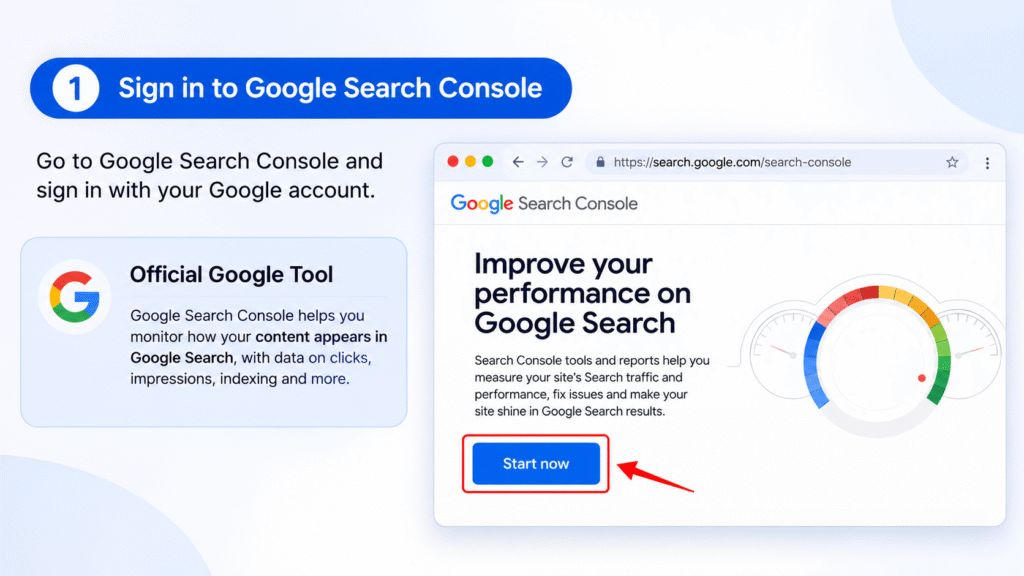
Follow these steps to connect social media to Google Search Console:1
- Sign in to Google Search Console.
2. Open the property selector.
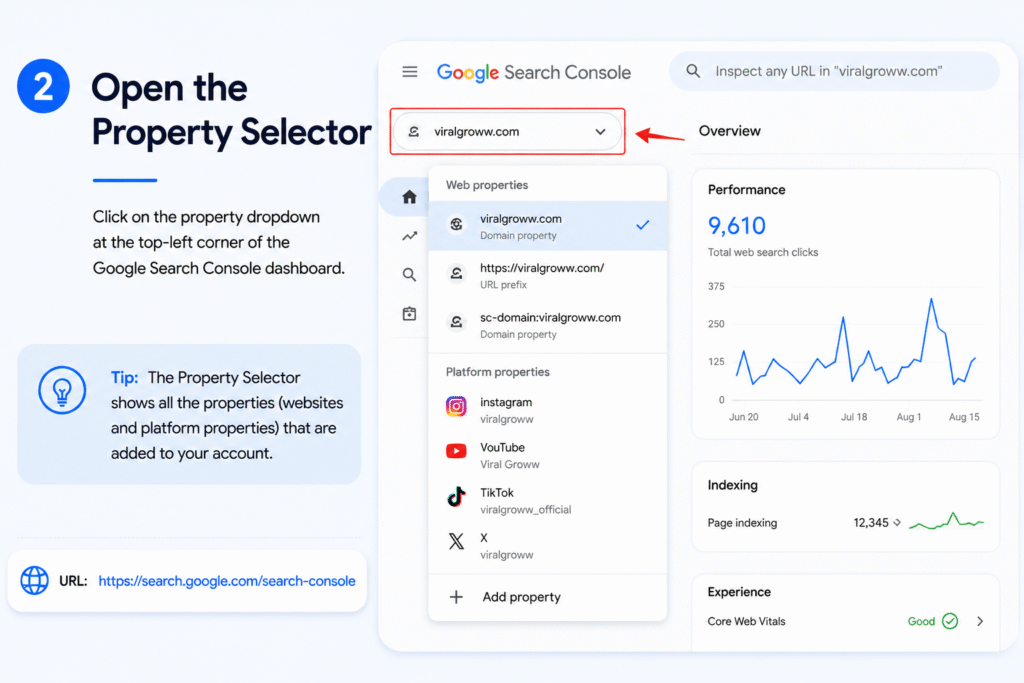
3. Click Add property.
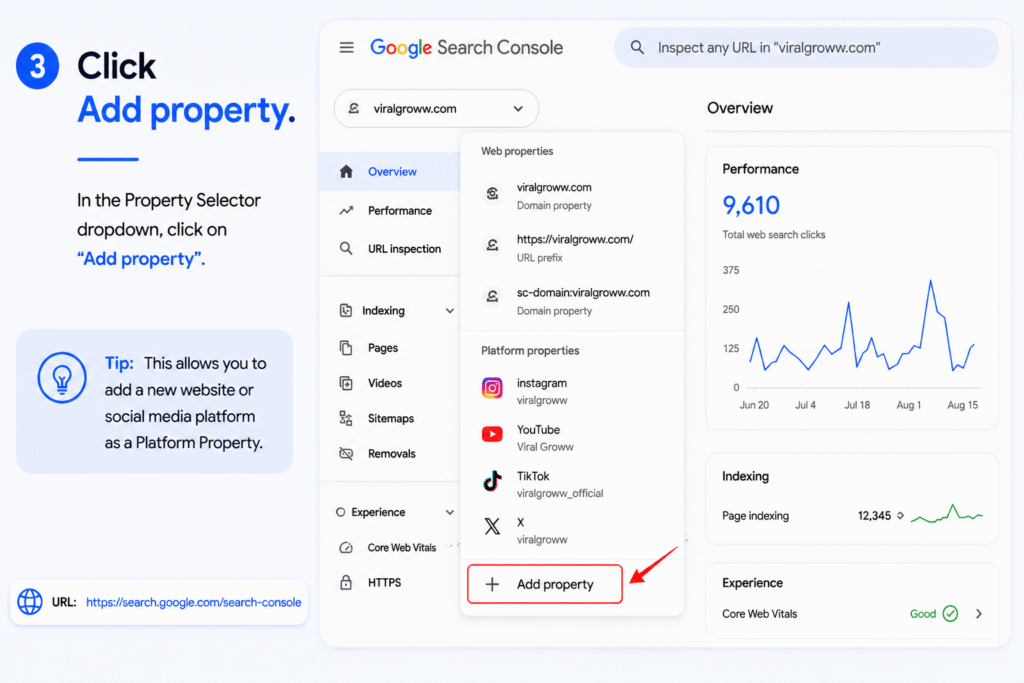
4. Choose Instagram, TikTok, X or YouTube.
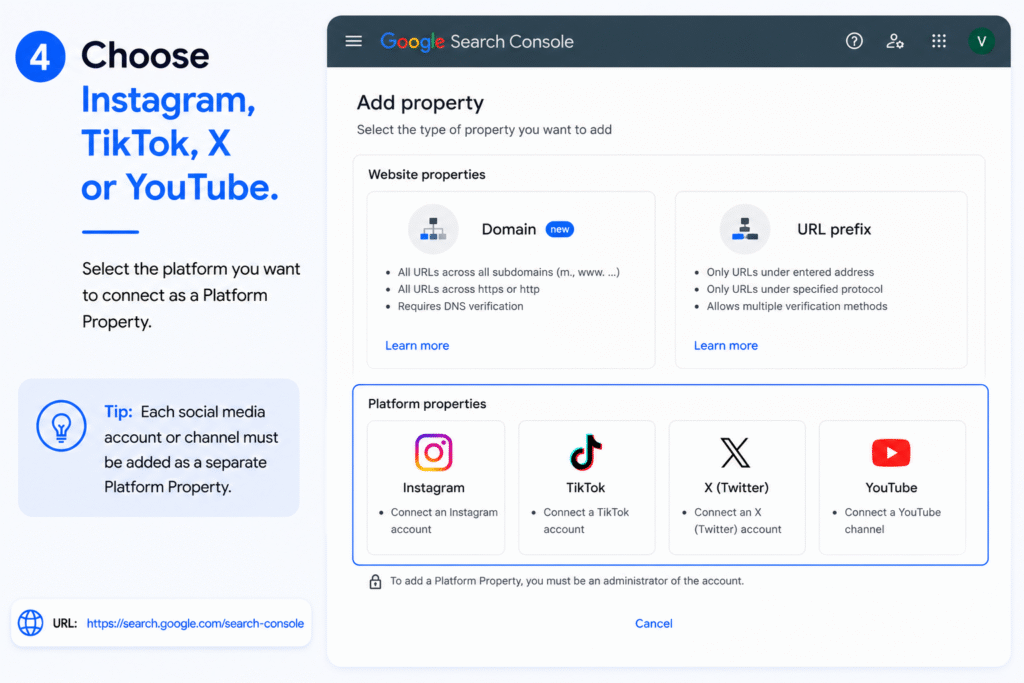
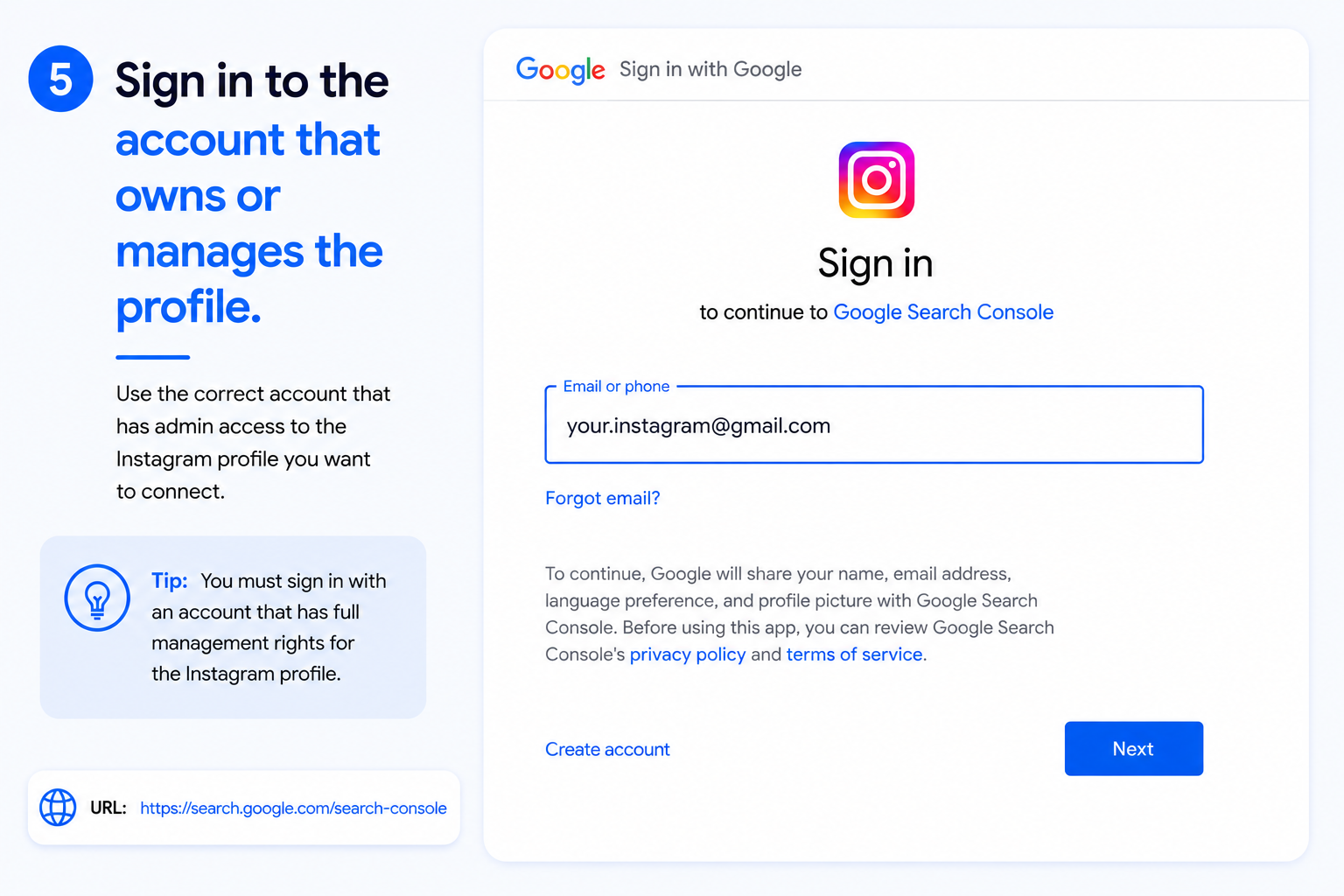
5. Sign in to the account that owns or manages the profile.
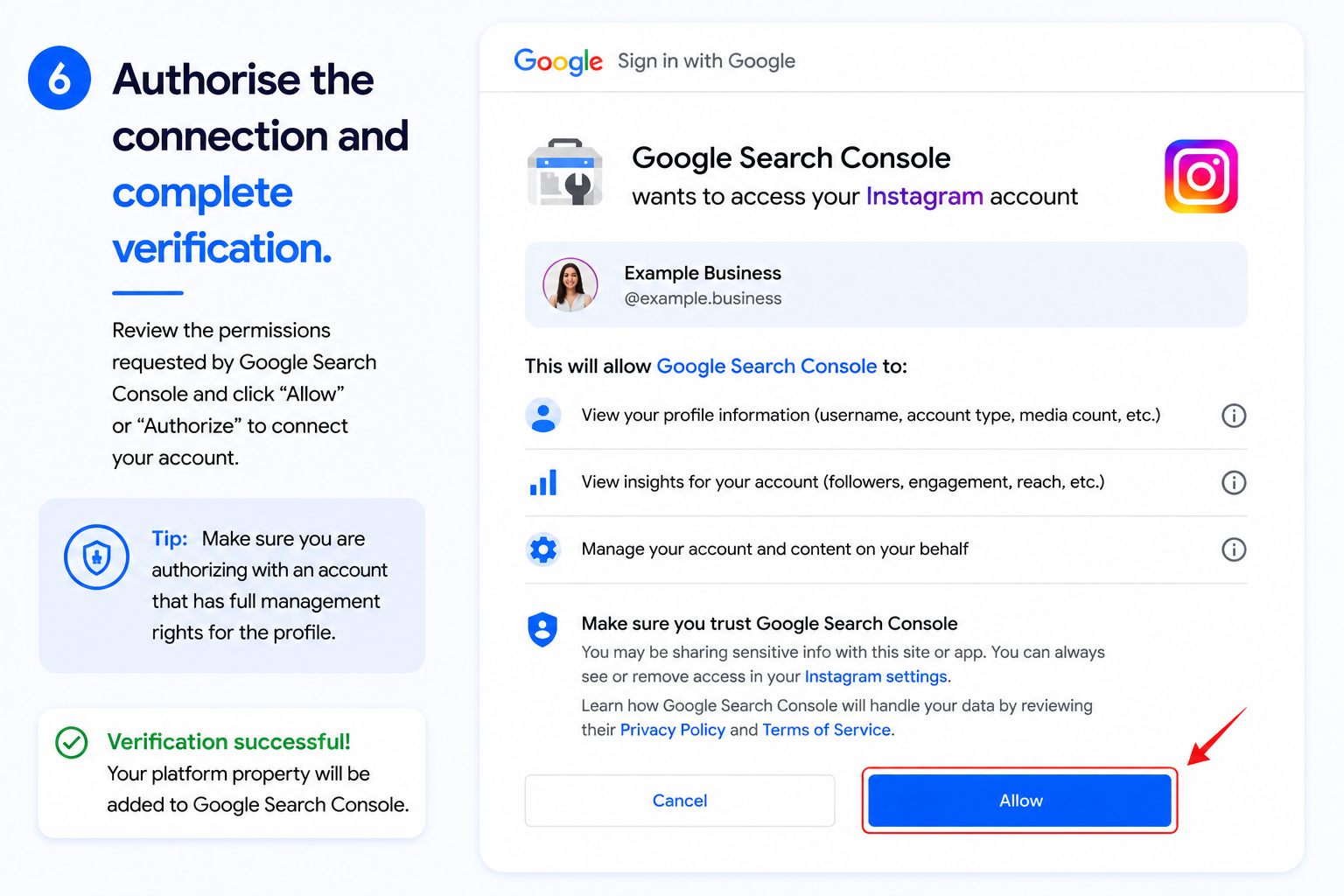
6. Authorise the connection and complete verification.
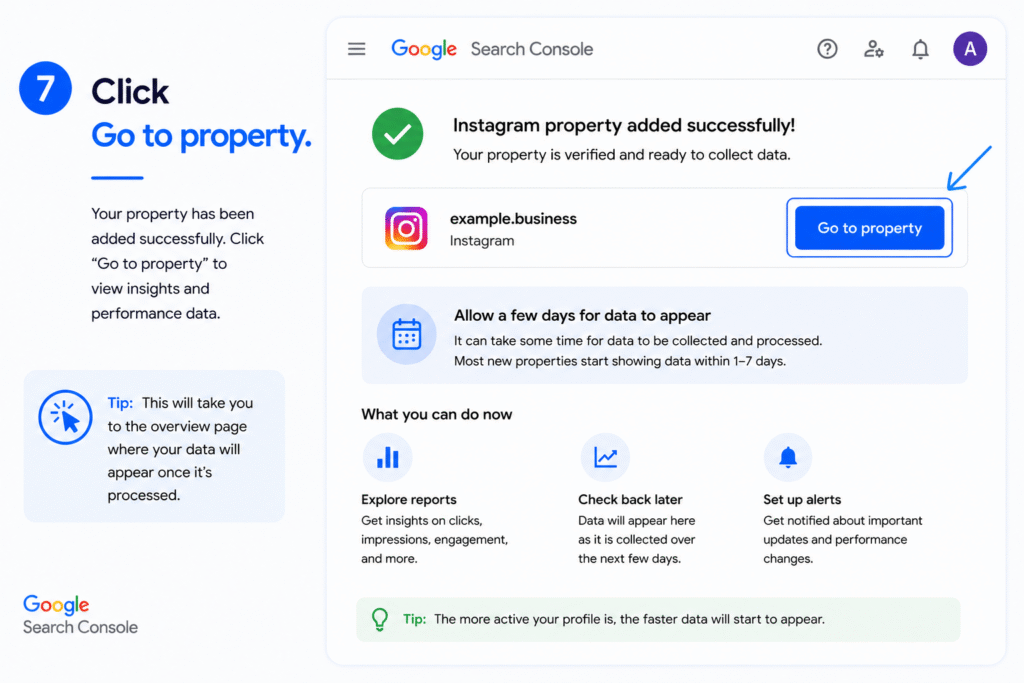
7. Click Go to property.
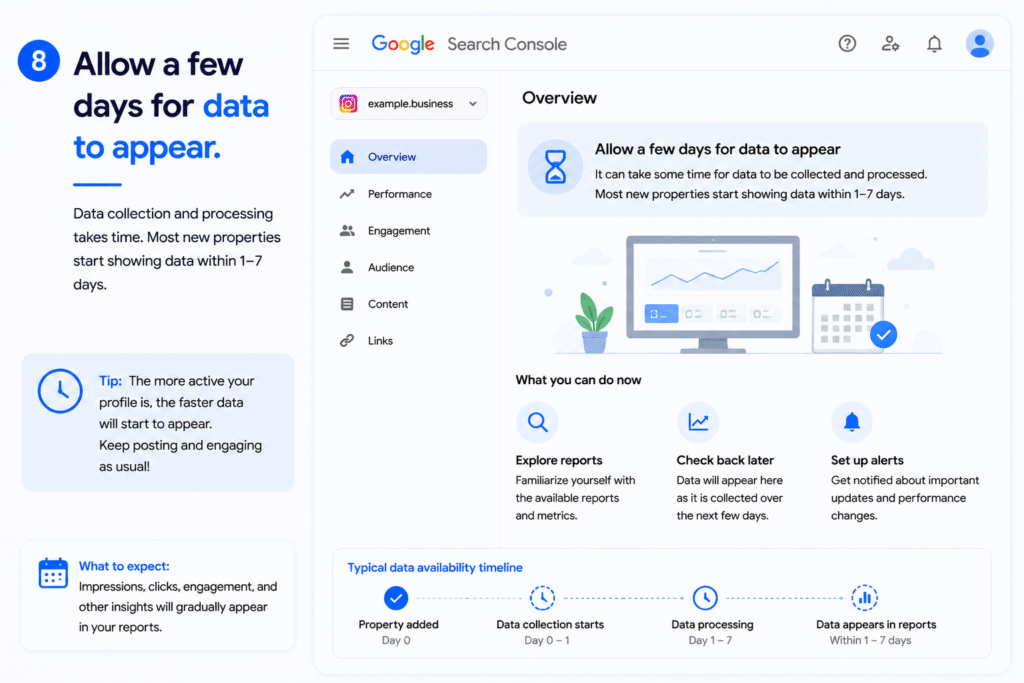
8. Allow a few days for data to appear.
Authorisation screens can differ by platform. Use an account with genuine management rights. Google periodically rechecks ownership, so an expired login may require re-verification.
Add original screenshots of the property selector and Performance report to make the tutorial easier to follow.
How to Connect Instagram to Google Search Console
Select Instagram under Add property, sign in with the account that manages the profile, approve the connection and complete verification.
Once reporting starts, you may see Google performance for eligible profile pages, posts, Reels and Stories. Google explains that a Story appearing in Search can count as an impression, while a click can count as a Search Console click.
A post with strong impressions but weak clicks may need clearer wording or a better match with search intent. This is Google discovery data, not total Instagram reach.
How to Connect TikTok to Google Search Console
Select TikTok, sign in to the correct account and authorise the connection.
The query report can reveal Google searches leading people to eligible TikTok videos. A skincare brand might discover impressions for “how to use niacinamide serum,” then create a follow-up video or supporting website guide.
Search Console does not show TikTok feed views, watch time, followers, likes or shares. Use TikTok Analytics for native performance.
How to Connect X to Google Search Console
Choose X, formerly Twitter, and verify the account through an authorised login.
The report can show which eligible posts or profile pages gain Google clicks and impressions. Use it to improve topic clarity, but do not assume editing a post automatically improves rankings.
Search Console measures how the content performs when discovered through Google. It does not report the complete reach or engagement generated inside X.
How to Connect YouTube to Google Search Console
Select YouTube and sign in with the Google account that manages the channel. Choose the correct channel and complete verification.
This is different from older Search Console Associations. The channel becomes its own Platform Property, allowing you to analyse eligible channel pages, videos, Shorts and playlists appearing through Google.
Continue using YouTube Studio for watch time, retention, subscribers and engagement inside YouTube.
What Data Can You Track?
Depending on available traffic, Platform Properties can show:
- Clicks and impressions
- Average CTR and average position
- Search queries
- Top-performing content
- Countries and devices
- Recent traffic trends
- Search, Discover and Google News performance
- Click-based achievements
Performance provides detailed filtering, Insights summarises trends, and Achievements highlights click milestones. Discover and Google News appear only when eligible traffic exists.
How to Use the Data to Improve Content
Turn Queries Into Content Ideas
Review queries with meaningful impressions, especially those connected with low clicks. They may reveal questions your content mentions without answering clearly.
Create a follow-up Reel, Short, video or post focused on that need. Repeated query themes can also become website articles or multi-post content series.
For example, if several videos receive impressions for variations of “how to choose a face serum,” the brand could create a detailed comparison Reel, a longer YouTube guide and a supporting website article.
Identify Rising and Declining Topics
When enough data exists, Insights can highlight top, trending-up and trending-down content or query groups.
Expand rising topics while interest is active. Refresh declining content with updated examples, clearer positioning or a stronger format. Query groups can also help teams understand a broader topic rather than reviewing every keyword separately.
Monitor Recent Changes
Use the 24-hour Performance view when available. Hourly data can reveal sudden interest, but it may be preliminary, so avoid making a major decision from one short spike.
If an old video begins gaining impressions, cross-promote it or create an updated follow-up while the topic is active.
Compare Content Formats
Export content-level data and compare Instagram Reels with posts or YouTube Shorts with long-form videos.
Do not judge formats by clicks alone. Compare impressions, CTR, average position and query type. A Short may generate broad discovery, while a longer video may attract fewer but more specific searches.
This comparison can show which format works best for tutorials, product questions, branded searches or awareness-focused topics.
Build a Cross-Platform Report
Each account is reported separately. Export data from Instagram, TikTok, X and YouTube into one spreadsheet using consistent columns for:
- Clicks
- Impressions
- CTR
- Search queries
- Content type
- Publishing date
This creates a useful social SEO dashboard without mixing Google discovery with native engagement.
Record Important Changes
Search Console supports custom annotations in Performance charts. Add one when you substantially change a caption, title or description.
Annotations add context but do not prove causation. They also do not appear in comparison mode or the 24-hour view.
What Platform Properties Do Not Track
Platform Properties do not provide a complete view of:
- Native-platform reach or feed views
- YouTube watch time
- Likes, comments, shares or followers
- Paid social campaign performance
- Native-platform conversions
Search Console answers one question: how does eligible content perform when people discover it through Google?
Use native analytics alongside Search Console. One measures Google visibility; the other measures behaviour within the social platform.
Common Problems and Fixes
Platform Property Option Is Missing
Platform Properties are now globally available in Google Search Console. If the option is not visible, refresh the page, sign in with the correct Google account, check whether you have sufficient access permissions, and try opening Search Console in an incognito window or another browser.
No Data Is Showing
New properties may take several days to collect and process data. Low Google visibility can also produce sparse reports.
The Connection Has Expired
Sign in again and re-authorise the platform. Search Console periodically checks whether you still control the connected account.
Multiple Profiles Are Not Combined
Every account or channel needs its own property. If your business manages several regional or brand profiles, repeat the setup process for each one.
Discover or Google News Is Missing
These reports appear only after eligible traffic is recorded. Their absence does not automatically indicate a technical problem.
Numbers Differ From Native Analytics
Search Console measures Google interactions. Native social tools measure activity within their own ecosystems, so the numbers should not be expected to match.
Who Should Use Platform Properties?
Creators and D2C brands can identify searches that bring new viewers and reveal product questions. Social and SEO teams can then connect website topics with Reels, Shorts and videos.
For practical examples of combining search insights with growth strategy, explore Viral Groww’s SEO and performance marketing case studies. You can also read its guide to how SEO works in 2026 and review its performance marketing services.
Final Verdict
Google Search Console Platform Properties extend Search Console beyond websites. Instagram, TikTok, X and YouTube accounts can receive their own reports after successful verification and when the feature is available.
The data can reveal clicks, impressions, CTR, average position, queries and top-performing content across Google Search. Discover and Google News data may appear when eligible.
The feature does not guarantee indexing, directly improve rankings or replace native social analytics. Its real value is giving creators and brands Google search behaviour that can guide future videos, posts, captions and website content.
Need help connecting SEO, social content and performance data into one growth strategy? Viral Groww can review your visibility, content and tracking setup and identify practical opportunities to improve organic discovery.
Frequently Asked Questions
What Is a Platform Property in Google Search Console?
It is a verified Instagram, TikTok, X or YouTube account added as a separate Search Console property. It reports how eligible content performs through Google Search and, when applicable, Discover and Google News.
Is Platform Property available to all Google Search Console users?
Yes. As of July 29, 2026, Google Search Console Platform Properties are globally available to everyone. Users can connect their supported Instagram, TikTok, X, and YouTube accounts to analyse how their social and video content performs across Google Search, Discover, and Google News.F
Can TikTok Be Added to Google Search Console?
Yes. TikTok is officially supported. Search Console can show Google-driven clicks, impressions and queries, but TikTok Analytics is still required for native views and engagement.
Does Search Console Track YouTube Shorts?
Eligible Shorts can be included when they appear through Google surfaces. YouTube Studio remains the correct tool for watch time, retention, subscribers and engagement inside YouTube.
Does Search Console Replace Social Media Analytics?
No. Platform Properties measure visibility generated through Google. Native tools are still required for platform reach, engagement, followers, retention and paid campaign reporting.
Why Is No Data Showing in My Platform Property?
New properties can take several days to process data. The account may also have limited Google visibility, incomplete verification or an expired connection.